_edited.png)
How to Use ChatGPT Atlas Agent Mode to Run 80% of Your Marketing

Updated: Feb 16
You can turn your browser into a $30/hr AI marketing assistant by using ChatGPT Atlas Agent Mode to run the first three steps of the SCALE Method: Scan, Compile, and Stress Test. This step-by-step tutorial shows how to automate competitor analysis and market research using agentic browsing—so the agent can navigate real websites you choose, extract competitor promises, proof, objections, and friction, and compile a ranked Opportunity Shortlist based on observable market signals. Instead of relying on generic prompts or static assumptions, this workflow produces structured outputs (a Market Scoreboard, Opportunity Shortlist, and Offer Stress Test) you can use to publish smarter and improve conversions. |
An AI marketing assistant should be doing your competitor research for you—not your brain at 11pm with 20 tabs open. That’s why I use ChatGPT Atlas in Agent Mode like a browser-based ChatGPT agent to automate competitor analysis, extract real market signals, and turn messy research into a simple action plan.
If you’ve ever opened 20 competitor tabs, skimmed a few headlines, then closed your laptop feeling less certain than when you started… you already know the problem.
Most marketing “research” isn’t research. It’s doom-scrolling with extra steps.
And when you’re a solo entrepreneur, that’s deadly—because time is the one resource you don’t get to buy more of.
In this post, I’ll show you the 3 steps that do 90% of the work:
Scan (extract real market signals from live pages)
Compile (turn those signals into a ranked Opportunity Shortlist)
Stress Test (stress-test your offer and messaging for conversion leaks)
Run these properly and you stop guessing what to create, what to say, and what to sell—because you’ll have usable marketing decisions on demand.
These are the first three moves of SCALE—because they create immediate value and set up everything else.
In this article:
What “Agentic Browsing” Means (and why it changes marketing research)
Prompt-Rich, Strategy-Poor: Why Most People Don’t Get Results With AI
The AI Marketing Assistant Most People Never Build: A Weekly System (Not More Prompts)
Step 1: Scan What’s Winning With ChatGPT Atlas Agent Mode (So You Stop Creating Based on Hope)
Step 2 — Compile Data Into a Ranked Plan of Action (Using ChatGPT Atlas Agent Mode)
Step 3 — Stress Test Your Offer to Stop Leaking Leads (Using ChatGPT Atlas Agent Mode)
I recommend watching the tutorial above before diving in so you understand how each step works before you dive into setup.
What “Agentic Browsing” Means (and why it changes marketing research)

Most people use AI like a chat box: you ask a question, it answers, and you hope it’s grounded in reality.
Agentic browsing is different. It’s when your AI marketing assistant can take “worker” actions inside the browser—like opening tabs, navigating pages, scanning sections, and compiling notes—while you stay in control as the strategist.
That matters because the bottleneck in marketing usually isn’t creativity.
It’s time + attention.
Manual research turns into a mess fast:
too many tabs
half-finished notes
vague takeaways
zero execution
With ChatGPT Atlas in Agent Mode, you’re not just getting answers—you’re building a repeatable process that turns browsing into structured outputs you can actually use.
And that’s the key difference:
Normal AI gives you ideas.
Agentic browsing gives you a workflow.
But here’s the twist: most people still don’t get results—even with better AI—because they’re using it like a prompt generator instead of a system.
That’s what we fix next. But first, we must install ChatGPT Atlas, thankfully, that's easy!
If you’re brand new to this, start here first: What Is ChatGPT? The Surprisingly Simple AI Explained for Beginners then come back and run the Atlas workflow.
How to Install ChatGPT Atlas on macOS (Quick Setup)

OpenAI introduced ChatGPT Atlas on October 21, 2025, and installing it on macOS is as simple as Chrome. OpenAI
If you want more real-world examples beyond this SCALE workflow, I’ve also put together How to Use ChatGPT Atlas: 8 Money-Making Workflows for Solopreneurs (includes free prompts) it’s a practical library of ways to turn Atlas into a daily revenue engine.
Before you can use ChatGPT Atlas Agent Mode as your AI marketing assistant, you need Atlas running on your Mac. Setup is basically the same as installing Chrome—download the installer, drag it into Applications, then sign in.
What you need: an Apple silicon Mac (M-series) and a supported macOS version for Atlas.
Install in 3 steps:
Open the .dmg and drag ChatGPT Atlas into Applications, then eject the installer.
Open Atlas from Applications (or Spotlight), sign into ChatGPT, and optionally import bookmarks/passwords during onboarding.
For a more detailed explanation of 'how to install chatgpt Atlas' visit this link.
Once you see the Ask ChatGPT button and can switch into Agent mode (it's a dropdown in the chat window), you’re ready to run the SCALE workflow.
Installing Atlas is the easy part.
The hard part is what happens next—because most people open it, type a few prompts, get a few “smart” answers… and still don’t move the needle. That’s what “prompt-rich, strategy-poor” looks like.
Prompt-Rich, Strategy-Poor: Why Most People Don’t Get Results With AI

Here’s the trap almost everyone falls into:
They collect prompts like they’re collecting progress.
New prompt packs. New “secret” frameworks. New ChatGPT tricks.
And yet… nothing compounds.
Because being prompt-rich doesn’t make you effective. It just makes you busy.
Most entrepreneurs aren’t failing at AI because they don’t have the right words to type. They’re failing because they don’t have a strategy that turns research into actions—and actions into revenue.
That’s what an AI marketing assistant is supposed to do.
Not “generate ideas.”Not “summarize competitors.”Not “write 20 hooks.”
A real system produces decisions:
What to say (based on repeated market language)
What to build (based on gaps competitors ignore)
What to fix (based on clarity, proof, objections, friction)
What to do first (Impact vs Effort)
This is why the SCALE Method matters.
It forces the jump most people avoid: from prompts → to priorities.
So if you’ve felt like you’re using AI nonstop but nothing is improving… you’re not behind.
You’re just drowning in input—when what you actually need is output.
And that’s exactly what we build next.
The AI Marketing Assistant Most People Never Build: A Weekly/Monthly System (Not More Prompts)

Most people treat AI like a slot machine: pull the lever, hope for a good idea.
A real AI marketing assistant works more like a weekly operating system—because marketing results compound when you run the same process repeatedly.
Here’s the weekly loop you’re building:
Scan the market (competitors, comments, FAQs) to capture real signals
Compile those signals into a ranked action plan (Impact vs Effort)
Stress Test your offer to remove conversion leaks (clarity, proof, objections, friction)
And it produces three assets you can reuse every week:
Market Scoreboard (what the market is rewarding right now)
Opportunity Shortlist (what to do next, ranked)
Offer Stress Test (what to fix so attention turns into sales)
That’s how you publish smarter, waste fewer cycles, and turn “research” into revenue—without hiring a team or burning out.
Step 1: Scan What’s Winning With ChatGPT Atlas Agent Mode (So You Stop Creating Based on Hope)

This is where your AI marketing assistant becomes useful—because instead of guessing what to post or what to say, you build a live scoreboard of what your audience is reacting to right now.
Using ChatGPT Atlas Agent Mode as a browser-based ChatGPT agent, you’re not copying content. You’re extracting the underlying patterns that drive clicks and engagement—so your next decisions are based on observable signals, not hope.
Step 1: Scan has one job: collect the right signals. No planning. No rankings. No offer critique. Just clean inputs that Step 2 (Compile) can turn into an execution plan.
The Scan looks for 3 things
1) Winning Content (What’s getting traction right now)
Your goal is to identify what the market is already rewarding—especially on YouTube, where titles, hooks, and formats reveal what people can’t ignore.
Have your ChatGPT agent scan:
Top videos in your niche (views + velocity + comment activity)
The top titles and thumbnails patterns
The first 10 seconds (hook style)
The structure/format (list, demo, teardown, story, tutorial)
The repeated angles (the “frame” that keeps winning)
Winning Content Capture:
Top 10 winning titles (copy exactly):
Hook style used in first 10 seconds (pattern):
Format/structure (pattern):
Repeated angles/framing (pattern):
What viewers praise most (from comments):
What viewers ask for next (from comments):
2) Competitor Promises (The key claims + hooks on landing pages)
This is the competitor analysis part of Scan: you’re collecting what competitors are promising and how they frame the outcome.
Have ChatGPT Atlas Agent Mode scan competitor landing pages and capture:
Headline promise (outcome + timeframe + mechanism)
Subheadline (how they reduce risk: “without X,” “even if Y”)
Who it’s for / not for
The “mechanism” phrase (what they call their method)
Primary CTA wording
Competitor Promise Capture (copy/paste):
For each competitor page:
URL:
Headline (copy exactly):
Subheadline (copy exactly):
Mechanism phrase (copy exactly):
Primary CTA text:
3 repeated words/phrases that stand out:
1-sentence summary of the promise pattern:
3) Audience Language (The exact words + questions from comments and threads)
This is the most valuable output of market research automation because it gives you the language to use in your titles, hooks, and marketing.
Have your AI marketing assistant scan:
YouTube comments under winning videos
Reddit threads / community posts
Any high-signal discussions where people complain, ask, or debate
Extract:
Exact pain phrases
Exact desire phrases
Repeated questions
Common “I tried X but…” statements
Words that signal confusion or skepticism
Audience Language Vault (copy/paste):
10 repeated pain phrases (exact quotes):
10 repeated desire phrases (exact quotes):
10 repeated questions (copy exactly):
5 “I tried X but…” statements (quotes):
5 confusion points (what they don’t understand yet):
Build the Scan Scoreboard (Your one-page market snapshot)
Once the agent gathers the three buckets above, you want a single scoreboard that makes patterns obvious at a glance.
SCAN SCOREBOARD:
What’s winning right now (top formats + angles):
The 3 most repeated promise patterns:
The 3 most repeated audience questions:
The most repeated phrases (exact wording):
The content gaps I can fill (what people want but aren’t getting):
The single best next topic to publish (based on the above):
This scoreboard becomes the input for Step 2 (Compile), where your ChatGPT agent turns signals into a ranked Opportunity Shortlist.
The exact Scan Prompt for ChatGPT Atlas Agent Mode (copy/paste)

You can start with the simple prompt above, or leverage the more advanced prompt below.
"You are my AI marketing assistant using ChatGPT Atlas Agent Mode as a browser-based ChatGPT agent. Your job is Step 1: Scan What’s Winning for competitor analysis and market research automation.
Focus ONLY on these 3 buckets:
Winning Content: what’s getting traction in my niche (YouTube titles, hooks, formats, angles).
Competitor Promises: key claims and hooks on competitor landing pages (headline, subheadline, mechanism phrase, CTA).
Audience Language: the exact words and questions from comments and threads (quotes required).
Rules:
Do NOT create a plan, rank ideas, or suggest what I should do yet (that’s Step 2: Compile).
Do NOT critique my offer or diagnose conversion leaks (that’s Step 3: Stress Test).
For Audience Language, include exact quotes and link to the source page.
Only call something a “pattern” if it appears in at least 2–3 different sources.
Inputs:
Winning content sources (YouTube): [paste 3–10 URLs]
Competitor landing pages: [paste 3–10 URLs]
Threads/comments sources: [paste URLs]
Keywords/context: AI marketing assistant, AI for marketing, competitor analysis, market research automation
Output format:A) Winning Content patterns + the Winning Content Capture template filledB) Competitor Promises patterns + the Competitor Promise Capture template filledC) Audience Language Vault filled (quotes + questions)D) Final Scan Scoreboard (1-page summary). Ask me for this input in a sequential order so I do not get overwhelmed."
Step 2 — Compile Data Into a Ranked Plan of Action (Using ChatGPT Atlas Agent Mode)

Scanning is great, but without a plan, it’s just prettier data.
Step 2 is where your AI marketing assistant turns everything you captured in Step 1 (Scan) into an Opportunity Shortlist—a ranked plan you can execute this week.
Using ChatGPT Atlas Agent Mode as a browser-based ChatGPT agent, you’re not asking for “more ideas.” You’re converting your competitor analysis and market research automation into prioritized decisions—so you know exactly what to publish, what to improve, and where to distribute it.
What “Compile” means when it comes to scaling your business with AI.

Compile takes your Scan Scoreboard and turns it into actions, ranked by Impact vs Effort—which means you’re no longer staring at “interesting insights” wondering what to do next.
Instead, your AI marketing assistant converts what you found in
Step 1: Scan into a short list of moves that are:
Most likely to work (because they’re tied to repeated market patterns)
Fastest to execute (so you actually ship them)
Highest leverage (so your effort compounds)
Impact answers: “If I do this, how much will it move the needle?”Think: more clicks, better retention, higher opt-in rate, more qualified leads, more sales.
Effort answers: “How hard is this to implement?”Think: time, complexity, tools, dependencies, team involvement, asset creation.
So compiling is basically triage:
High Impact + Low Effort → do immediately (these are your “quick wins”)
High Impact + High Effort → schedule and plan (these are your “big rocks”)
Low Impact + Low Effort → optional filler (only if you have spare capacity)
Low Impact + High Effort → delete (these are productivity traps)
And the key rule that keeps Compile from turning into fluff:
Every action must connect back to something you scanned—either a winning content pattern, a repeated competitor promise, or real audience language—so your competitor analysis and market research automation actually produce decisions you can trust.
The Agent compiles 3 opportunity buckets
1) Content: What to publish next (titles, hooks)
This bucket turns “what’s winning” into a repeatable publishing plan.
Your AI marketing assistant should generate:
10 title ideas modeled on the winning title patterns you scanned
10 hook ideas (first 3–10 seconds) that match the winning hook styles
5 content formats to rotate weekly (demo, teardown, list, tutorial, story)
3 angles to own (the frames that are consistently getting attention)
Content Opportunity Template (copy/paste):
Opportunity:
Why it will work (pattern from Scan):
Effort (Low/Med/High):
Impact (Low/Med/High):
First step today:
2) Offer: How to improve your page so more people say yes (headlines, bullets, proof)
This bucket is not the full Stress Test yet. It’s the shortlist of improvements suggested by what you saw competitors promise and what your audience keeps asking for.
Your ChatGPT agent should compile:
5 headline angles to test (based on competitor promise patterns)
5 bullet points to add or rewrite (based on repeated audience questions)
3 proof assets to create or surface (based on what the market responds to)
3 objections to address more directly (based on audience language patterns)
Offer Opportunity Template (copy/paste):
Opportunity:
Why it will work (pattern from Scan):
Effort (Low/Med/High):
Impact (Low/Med/High):
First step today:
3) Distribution: Where to push your content so it doesn’t die in silence (partners, communities)
This bucket ensures your content gets in front of people who already care.
Your AI marketing assistant should compile:
10 distribution targets (partners, communities, newsletters, podcasts, groups)
5 collaboration targets (creators already winning in your niche)
5 repurposing paths (one video → 3–10 assets across platforms)
3 “easy wins” you can execute this week (comments, outreach, repost strategy)
Distribution Opportunity Template:
Opportunity:
Why it will work (pattern from Scan):
Effort (Low/Med/High):
Impact (Low/Med/High):
First step today:
The Opportunity Shortlist (Ranked Plan You Can Execute This Week)
Once you have all three buckets, ask Atlas agent to rank them. This is the difference between “insights” and execution.
OPPORTUNITY SHORTLIST:
Rank:
Bucket (Content / Offer / Distribution):
Opportunity:
Why it will work (pattern from Scan):
Effort (Low/Med/High):
Impact (Low/Med/High):
First step (do this today):
The 'Compile' Prompt

If you want a real-world example of Atlas/Agent-driven distribution that can spike reach fast, see my walkthrough: How to Use ChatGPT Agent to Go Viral (50k views in 48hrs).
Step 3 — Stress Test Your Offer to Stop Leaking Leads (Using ChatGPT Atlas Agent Mode)

You can do everything right—publish consistently, follow the market, even ride winning angles—and still lose money if your offer is unclear.
Because great content means nothing if the final message doesn’t make people say:“Oh. That’s for me.”
This is where your AI marketing assistant shifts from “research mode” to “conversion mode.”
Using ChatGPT Atlas Agent Mode as a browser-based ChatGPT agent, you’ll have the Agent score your offer against the market patterns you just captured—then tell you what to fix first so attention turns into leads (and leads turn into sales).
What the Agent stress tests for (5 critical factors)
1) Clarity
Can someone understand what you’re selling in 5 seconds?
The Agent checks for:
A clear “what it is” statement (not just hype)
Who it’s for (and who it’s not)
What happens next (what they get, how it works, what to do)
If clarity is weak, people hesitate—even if they’re interested.
2) Outcome
Does your offer communicate a specific transformation?
The Agent checks for:
The before/after (what changes)
The “time to result” (if applicable)
The tangible deliverables (what they receive)
If the outcome is vague, the offer feels optional.
3) Proof
Do you give people a reason to believe?
The Agent checks for:
Testimonials, results, numbers, case studies
Credibility signals (experience, credentials, recognitions)
Demonstrations (what’s inside, screenshots, examples)
If proof is missing, people assume you're just another competitor vying for attention.
4) Objections
Are you answering the doubts people are already thinking?
The Agent checks for:
“Will this work for me?”
“Is this beginner-friendly?”
“Do I need experience?”
“Is this just prompts?”
“Do I have time?”
If objections aren’t handled, you lose qualified buyers who were almost ready.
5) Friction
How many points of confusion or effort exist between interest and action?
The Agent checks for:
Confusing structure, long blocks, unclear steps
Weak CTA placement or wording
Too many choices / too many links
Any “wait, what do I do now?” moments
Friction kills conversions more than bad copy does.
The exact Stress Test Prompt for ChatGPT Atlas Agent Mode
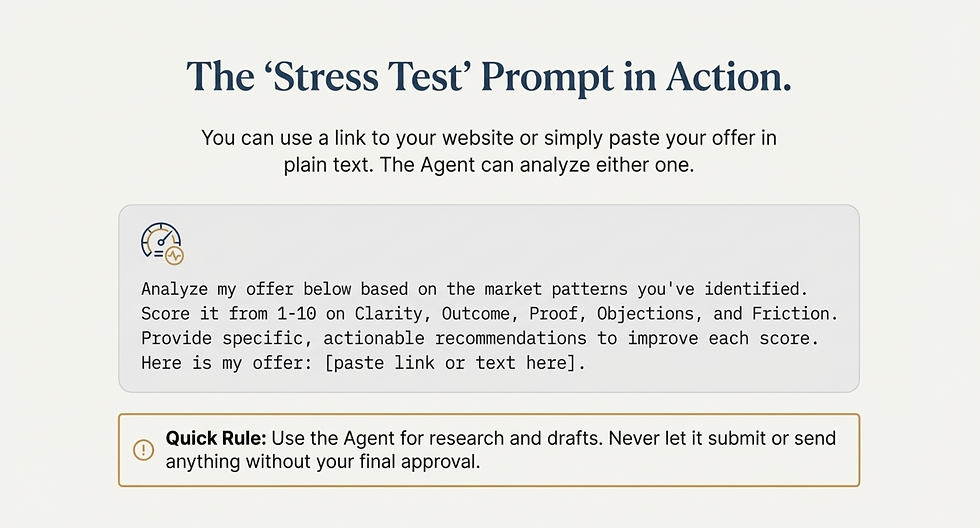
Here is a more advanced prompt for you to test.
STRESS TEST PROMPT: "You are my AI marketing assistant using ChatGPT Atlas Agent Mode as a browser-based ChatGPT agent.Analyze my offer below based on the market patterns we identified in Step 1 (Scan) and the priorities from Step 2 (Compile).
Score my offer from 1–10 on:
Clarity
Outcome
Proof
Objections
Friction
For each score:
Explain why it scored that way (briefly).
Provide specific, actionable recommendations to improve the score.
Give me the top fixes first (highest impact, lowest effort).
Then output:
A ranked list of the top 10 fixes (Impact vs Effort).
Revised copy suggestions where needed (headline, subheadline, bullets, CTA).
Here is my offer: [paste link or paste offer text here]
Quick Rule: Use the Agent for research and drafts. Never let it submit or send anything without my final approval."
What you’ll get after the Stress Test (so it becomes actionable)
When you run Step 3, you’re not looking for a generic critique. You want a ranked fix list.
Your ChatGPT agent should output:
A score from 1–10 for each factor (Clarity, Outcome, Proof, Objections, Friction)
The top 3 leaks causing drop-off
The highest-impact fixes first (what will move conversions fastest)
Suggested rewrites (headline, subhead, bullets, CTA) where needed
This is what turns Step 1 + Step 2 into actual revenue outcomes.
Run This Weekly/Monthly: The SCALE Loop for AI Marketing

If you take nothing else from this post, take this:
You don’t need more prompts. You need a repeatable system.
Because the entrepreneurs who win with AI for marketing aren’t the ones who “know the best tools.”
They’re the ones who run the same workflow every week until their messaging gets sharper, their offers get clearer, and their content starts compounding.
Here’s the weekly loop:
Step 1: Scan (build your Market Scoreboard from real-time signals)
Step 2: Compile (turn signals into a ranked Opportunity Shortlist)
Step 3: Stress Test (fix the leaks so attention turns into leads)
Do this once a month for a start, then when you're ready to really scale, do it once per week and you’ll stop guessing what to publish, what to improve, and what to sell—because you’ll be making decisions based on the market, not mood.
Want the exact AI resources I use?
If you want the resources I use to run this system—so you don’t have to re-build everything from scratch—I’ve put them together in one place.
Inside you’ll get:
The SCALE prompts (Scan / Compile / Stress Test)
The Market Scoreboard template
The Opportunity Shortlist template (Impact vs Effort)
The Offer Stress Test checklist (Clarity, Outcome, Proof, Objections, Friction)
And if you want to go deeper, this is the exact kind of system I teach inside my 28 Day Ai Challenge —so you’re not just “using AI,” you’re building an operating system that consistently produces leads and sales.


Comments