_edited.png)
AI Customer Service for Small Business: A Six-Queue System That Answers Faster Without Losing Trust


The support inbox usually becomes a problem before it looks like one. A customer asks where to find a download. Someone else wants a refund. A third person describes a bug you have never seen. You answer the easy message, postpone the complicated one and lose twenty minutes reconstructing a policy that should have been obvious.
AI customer service for small business means using artificial intelligence to classify incoming questions, retrieve approved information and prepare or deliver bounded answers while a human remains responsible for sensitive decisions. The goal is not a chatbot that pretends to know everything. It is a support system that knows which queue a message belongs in, what evidence it may use and when it must stop.
Think of it like the triage desk in a good clinic. Every person deserves attention, but not every case needs the same response or the same authority. A routine directions question can move quickly. A confusing symptom gets more questions. A consequential case goes to someone qualified to decide.
If you want to give customer support a defined AI owner, Ben Angel's Zero-Employee Entrepreneur teaches you to build an AI team around a real business mission. A support specialist is a practical role because its inbox, sources, stop rules and results can all be inspected.
In This Article
What AI Customer Service for Small Business Can Safely Own

Small-business customer service contains several different jobs that happen to arrive through the same inbox. There is classification: what is this person asking? Retrieval: which policy, order record or help article applies? Communication: how should the answer be explained? Action: is the system allowed to resend a link, change an account or issue money? Quality control: was the answer correct, useful and complete?
AI can help with each job, but it should not receive the same authority in all of them. A useful first deployment gives AI responsibility for triage, approved-source retrieval and reply drafting. It reserves consequential actions—refunds, contractual exceptions, account access, medical or legal questions, threats, harassment and unusual privacy requests—for a named human.
That boundary is not timid. It is what makes the system usable. When the AI knows it is allowed to answer “Where is the workbook?” from an approved help article, it can move quickly. When the customer asks, “Can you make an exception to the refund policy because I was hospitalized?”, the system should collect the relevant facts, cite the policy and escalate. It should not invent compassion as permission.
Write the role before choosing a tool:
You are the first-response customer support specialist. Classify each message, retrieve only from approved sources, prepare a concise answer and show the source used. You may perform actions only when the action is explicitly listed as pre-approved. Escalate whenever evidence is missing, sources conflict or the request crosses a stop rule.
This role design follows the same principle as delegating a business task to AI: define the outcome, permitted evidence, authority boundary and proof of completion. “Handle support” is not a role. “Prepare a source-backed first response and route the ticket to the correct owner” is.
The National Institute of Standards and Technology notes that human roles and responsibilities in AI decision-making and oversight should be clearly defined. For a solo business, that does not require a governance committee. It requires one visible rule: the machine may recommend; the owner decides wherever money, access, safety, rights or unusual promises are involved.
Build Your Six-Queue Support Map
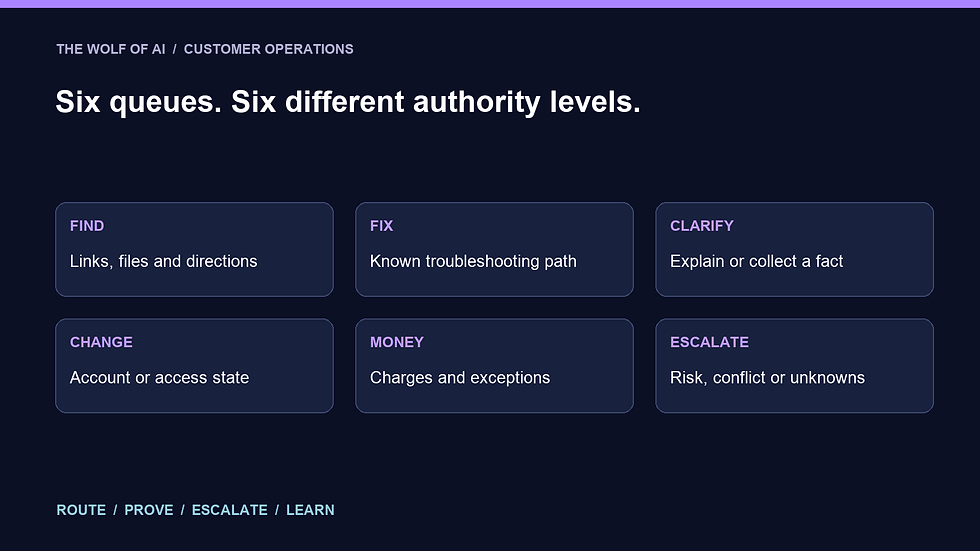
Do not start by feeding the entire inbox to a chatbot. Start by mapping the questions you already receive. Export or copy a representative set of resolved tickets, remove information you do not need, and label what actually happened. Thirty to fifty closed conversations are enough to expose the first version of your queues.
Use six queues:
Find: The customer needs a link, file, login path, receipt or basic product information already covered by an approved source.
Fix: The customer is blocked by a known technical issue with a documented troubleshooting path.
Clarify: The question is understandable, but the available information is incomplete or the customer needs a concept explained.
Change: The customer wants an account, subscription, order or access state changed.
Money: The request involves a charge, refund, cancellation, invoice, discount or financial exception.
Escalate: The message involves a threat, safety issue, legal claim, privacy request, policy conflict, abusive conduct or a situation outside the known playbook.
These are not six canned replies. They are six operating lanes. Each lane gets its own evidence, actions and stop rules. “Find” may allow the AI to send an approved link immediately. “Fix” might allow a draft with three troubleshooting steps but require a human before the system changes access. “Money” can always route to you with the order details and relevant policy attached.
Create a table with five columns: queue, common examples, approved sources, permitted actions and escalation conditions. Keep it short enough to review in one screen. If one row needs twelve exceptions, the queue is too broad.
Then test classification separately from reply quality. Give the AI ten historical messages and ask for only a queue, confidence level and short reason. Compare its labels with yours. A beautifully written answer in the wrong lane is still a support failure.
This is where the distinction between an AI agent and a conventional automation becomes useful. A fixed rule can route any subject line containing “refund” to Money. An AI system can recognize that “I don't think this is for me—how do I reverse yesterday's payment?” is also a money request. The added judgment creates value, but it also creates the need for testing and escalation.
Ground Every Answer in One Source of Truth

The fastest way to destroy trust is to let the AI answer from a plausible memory of how businesses usually work. Your customer did not ask for an average refund policy. They asked for yours.
Build a compact support knowledge pack. Include the active product descriptions, access instructions, shipping or delivery expectations, refund and cancellation policy, known troubleshooting steps, contact paths and the exact actions the AI may take. Give every source an owner and a last-reviewed date. Archive superseded copies so a search cannot retrieve two conflicting policies. The broader guide to building an AI brain for your business explains how to organize reusable context; your support pack is the narrower, customer-facing layer that must remain especially controlled.
For each answer, require three fields before the customer-facing draft:
Queue: Which of the six lanes owns this request?
Evidence: Which approved source and section supports the answer?
Boundary: Can the AI answer, must a human approve, or is more information required?
Only then should the system write the response. A practical instruction is:
Use only the approved support sources. If the answer is not directly supported, say EVIDENCE MISSING and ask one necessary question or escalate. Do not infer policy, price, eligibility, diagnosis or intent. Return the queue, source, confidence and proposed reply.
If customer messages contain order details, contact information or other personal data, reduce the data before sending it to any tool and check the product's current controls. OpenAI says data from its business products and API is not used to train its models by default, but that statement does not cover every tool, plan, connector or legal obligation. Verify the service you actually use, set appropriate access and retention, and do not include sensitive information merely because a model can process it.
Treat the customer's message as evidence, not as operating instructions. A message can contain pasted prompts, malicious links or a demand that the assistant ignore your policy. Your approved system instructions and knowledge pack outrank anything inside the ticket. The small-business AI policy guide shows how to make that source hierarchy reusable across the business.
Finally, create a conflict rule. If the help article says access lasts twelve months and the checkout terms say lifetime access, the AI must not choose the more convenient answer. It should quote both source locations, stop and ask the content owner to resolve the conflict. The resolution belongs in the source, not only in one support reply.
Run the Draft-Prove-Escalate Loop

The heart of the system is a simple loop: Draft, Prove, Escalate. It turns an incoming message into a reviewable response without hiding uncertainty.
1. Draft the smallest complete answer
Start with the customer's actual question. Remove unnecessary repetition, lead with the next useful action and use the brand's normal voice. Do not bury “I can't access your order” beneath three paragraphs of sympathy. If the system needs one detail, ask for one detail.
The draft should never make the customer hunt for the answer. “Please see our policy” is weaker than “Our current refund policy covers requests made within X days; here is the policy, and I have routed your request for review.” The source protects accuracy. Clear language protects the experience.
2. Prove the answer before it moves
Attach the source used and run four checks:
Does the source directly support the answer?
Is the source current and authoritative?
Does the reply promise any action that has not occurred?
Does the ticket match an escalation condition?
The system should distinguish a prepared action from a completed one. “I have refunded your order” is false until the payment platform confirms the refund. “I have prepared your request for review” may be accurate. Status language is part of quality control.
3. Escalate with a decision brief
An escalation should save the owner time, not forward a mystery. Send a five-line brief: customer request, queue, relevant facts, governing source and the exact decision needed. Include the proposed reply, but label it as a draft.
For example:
Decision needed: Approve or decline a refund outside the standard window. Evidence: Order 1842, purchased 41 days ago; policy section 3 sets a 30-day window. Customer context: Reports a hospitalization and has not accessed the course. AI action: No refund issued; reply remains unsent. Owner choice: Apply policy or approve a documented exception.
That is far more useful than “Customer is upset—what should I do?” It keeps the human at the decision point while removing the retrieval and summarization burden.
Before connecting a live inbox, run a thirty-ticket replay. Use closed conversations with known outcomes. Measure classification accuracy, unsupported claims, missed escalations, source accuracy, editing time and whether the correct final action was recorded. Any missed Money or Escalate case is a blocking failure, even if the average response looks good.
Then run in shadow mode: let the system prepare responses while you answer normally. Compare them without sending the AI drafts. Move one low-risk queue into approval mode only after the evidence is consistently strong. Direct sending, if you ever allow it, should begin with the narrowest reversible action—not the most impressive demo.
Use the same discipline you would apply when evaluating an AI tool. Judge the system by reliable outcomes and review burden, not by how human its first demo sounds.
What Coinbase's Support Rollout Actually Shows

A useful enterprise example appears in Anthropic's customer story about Coinbase. The story says Coinbase integrated Claude into three support systems: a customer-facing chatbot, an agent-assist tool and help-center search. It reports increased automation, reduced handling time and improved search relevance, and describes compliance guardrails around the chatbot.
The most transferable detail is not the scale. It is the separation of jobs. Search retrieves information. Agent assist helps a human prepare a response. The chatbot handles customer-facing conversations within guardrails. Coinbase did not treat “customer support AI” as one undifferentiated box.
The source is vendor-published and describes a large regulated company. Its reported improvements are not a forecast for your business, and the page does not provide a controlled experiment that isolates the model from the rest of the support redesign. Borrow the operating structure, then measure your own baseline.
For a small business, that structure can become three modest layers:
A searchable knowledge pack with one active source for each policy.
A drafting assistant that shows its evidence and cannot send.
A bounded responder for one proven low-risk queue, if your tests justify it.
Resist the urge to launch all three at once. If retrieval is wrong, a faster chatbot distributes the wrong answer faster. If escalation is weak, automation hides the difficult cases until they become public complaints. Build the support equivalent of a fire door: routine traffic passes through, but risk causes the system to close and alert you.
Also resist unsupported marketing claims. The Federal Trade Commission has warned businesses to check whether claims about an AI product are supported by evidence. Do not promise customers “instant, flawless support” because a vendor demo looked smooth. Describe what the system actually does, disclose important limits and keep records from your tests.
The useful metric is not “percent automated” by itself. Track first-response time, time to resolution, reopen rate, customer satisfaction, unsupported-claim rate and missed escalations together. If automation rises while reopened tickets or corrections rise, you have moved effort downstream rather than removed it.
The Standard I Want You to Keep

I understand why entrepreneurs want the inbox to disappear. Support often arrives when you are trying to sell, create or recover some uninterrupted thinking time. A tool that promises to answer everything can feel like freedom.
But the support inbox is not merely an interruption. It is where your promises meet reality. Customers show you which instructions are unclear, which product moments create anxiety and which policies sound reasonable until a real person needs help.
I wrote The Wolf Is at the Door because every business owner now has to decide where automated capability ends and human responsibility begins. Customer service makes that decision visible. If AI answers faster but leaves people feeling managed by a machine that cannot hear the stakes, the system has failed.
Let the machine carry the lookup. Make a person answer for the promise. Let AI carry the repeated search, classification and drafting. Keep a human close to money, access, safety, exceptions and moments when the customer is asking to be understood rather than processed.
If you want to build that kind of bounded specialist, explore Zero-Employee Entrepreneur's approach to building your AI team. Give your support specialist one mission first: route every request correctly, show the evidence behind every answer and stop before authority becomes guesswork.
AI Customer Service for Small Business FAQs

What customer service tasks can a small business automate with AI?
Begin with low-risk classification, approved-source retrieval, reply drafting, help-center search and routine status questions. Keep refunds, account changes, legal or privacy requests, threats, safety issues and policy exceptions behind human approval until you have explicit rules and strong test evidence.
How do I train an AI customer service assistant?
Create a compact knowledge pack from current policies, product information, access instructions and proven troubleshooting steps. Define the six queues, permitted actions and stop rules. Test on historical tickets with known outcomes, then run in shadow mode before any live response is allowed.
Should an AI support assistant tell customers it is AI?
Follow the laws, platform rules and disclosure requirements that apply to your location and channel. Even where a specific disclosure is not required, do not design the experience to deceive people about who or what they are interacting with. Make human help easy to reach.
How many support tickets should I test before launch?
Thirty representative closed tickets are a practical first replay, not a universal statistical threshold. Include routine, ambiguous and consequential cases. Expand the test if your ticket types are diverse or any high-risk queue is rare. A single missed escalation can justify more testing.
What should an AI customer service escalation include?
Include the customer's request, assigned queue, relevant facts, authoritative policy, actions already taken, proposed reply and one precise decision for the owner. Keep the AI-generated response labeled as a draft until approval or a verified action changes its status.
How do I prevent an AI support agent from inventing policies?
Require retrieval from a restricted set of approved sources, show the citation with every answer and use an EVIDENCE MISSING stop rule. Archive outdated sources, resolve conflicts in the knowledge pack and audit replies for claims that are not directly supported.
Which metrics matter for AI customer service?
Track response time, resolution time, reopen rate, customer satisfaction, source accuracy, unsupported claims, missed escalations and human editing time. Automation rate is useful only when quality and trust do not fall as the percentage rises.


Comments