_edited.png)
How to Switch from ChatGPT to Claude in 5 Minutes (Step-by-Step Guide)

Updated: Aug 13
In early 2026, a growing backlash against OpenAI’s partnership with the U.S. Department of Defense stirred a consumer movement against ChatGPT, often tagged on social media and boycott sites as “QuitGPT.” According to reports, more than 1.5 million users publicly pledged to cancel or leave ChatGPT after OpenAI agreed to make its AI technology available for classified military use.
At the center of the controversy was Anthropic’s refusal to grant unrestricted defense access for its Claude AI models, particularly around issues of mass surveillance and autonomous weapons.
As a result, Claude climbed to the No. 1 position on the U.S. Apple App Store, overtaking ChatGPT in free downloads during the height of the debate.
Industry reports further note that Claude’s free user signups surged by more than 60%, with paid subscriptions more than doubling compared to earlier in the year.
Why Users Are Abandoning ChatGPT for Claude

Let’s set the stage. Anthropic — the company behind Claude — was negotiating an AI deal with the U.S. Pentagon. They agreed to everything except two things: no mass surveillance of Americans, and no autonomous weapons. When the Pentagon demanded "all lawful purposes" with zero restrictions, Anthropic walked away.
The administration responded by labelling Anthropic a "supply chain risk" — a designation normally reserved for foreign adversaries — and ordered all federal agencies to stop using Claude.
Hours later, OpenAI swooped in and signed the same deal. Sam Altman admitted on X that "the optics don’t look good." His own employees had signed an open letter supporting Anthropic’s position.
That’s when users started leaving. Not because Claude got better features — because OpenAI made a decision that broke trust.
I wrote about exactly this scenario in my book The Wolf Is at the Door — Threat #10: Weaponization.
The lesson?
Never build your entire business on a single AI platform. Power without strategy is just risk.
What Claude’s Memory Import Really Transfers (And What It Doesn’t)

When you import your ChatGPT memory into Claude, don’t think of it as a magical instant full transfer of all context and knowledge — it’s more like a strong first draft of your AI assistant’s understanding. Claude’s memory import feature uses the text you copy and paste to extract key preferences, tones, work context, and communication styles, and then builds that into its own memory structure.
That gives Claude a head start — it can start conversations knowing your preferred writing style and some high-level context right away — but it won’t include every detail from all your previous AI chats, files, documents, or nuanced past work unless you also feed that information to it. Claude’s memory tool is particularly tuned for work-related context and may prioritize professional details over personal minutiae.
Once work-related context is moving into Claude, read this Claude watermark explainer before using the output with clients or presenting it as finished professional work.
Because of that, it’s a good idea to add additional files, documents, and specific project context manually after the initial import if you want Claude to truly understand the depth of your work history and preferences. Think of the imported memory as an overview or summary — you’ll still need to retrain Claude on detailed or technical files over time if you want it to replicate everything ChatGPT knew about you.
The import process itself is simple — copy your exported ChatGPT memory and paste it into Claude’s memory import field — but the quality of what Claude ends up knowing depends on what you include: high-level context travels quickly, while deep knowledge takes additional input and usage over time before Claude fully internalizes it.
How to Switch from ChatGPT to Claude: Transfer Your ChatGPT Memory to Claude (3 Simple Steps)
Here’s the fastest way to migrate. The entire process takes less than five minutes.
Step 1: Open Claude’s Memory Import Tool

Go to Claude, then navigate to Settings → Memory → "Import memory from other AI providers." Claude will generate a custom prompt for you. Copy it.
Step 2: Export Your ChatGPT Memory
Open ChatGPT and paste the prompt Claude gave you. ChatGPT will output every single memory, preference, and piece of context it has stored about you. Copy the entire output.

Step 3: Import Into Claude

Go back to Claude and paste everything into the memory import field. Hit import. Done.
Your business context, writing style, audience preferences, and workflow habits — all transferred. Claude now knows you like ChatGPT did.
Step 4: Paste This Prompt into Claude to Extract The Files You Need Added
Important: Turn on Claude’s Memory Feature First
Before running the prompt below, make sure “Generate memory from chat history” is turned ON in Claude’s Memory settings.
This setting allows Claude to automatically extract and remember important information from your conversations — including your writing style, business context, preferences, and uploaded documents.
If this feature is turned off, Claude will still analyze the files you upload, but it won’t retain that information for future conversations, which defeats the purpose of rebuilding your assistant’s long-term understanding.
Turning memory on ensures that every document, example, and clarification you provide becomes part of Claude’s growing knowledge about how you work.
How to Rebuild Your ChatGPT Context Inside Claude
At this point, Claude has the high-level summary of who you are and how you work — but it still doesn’t have the deeper context from your previous chats, files, and documents.
The fastest way to fix that is to let Claude tell you exactly what information it still needs.
Paste the prompt below into Claude. It will analyze the memory you imported and then guide you through uploading the most important files from your ChatGPT workflow — things like writing samples, business documents, and strategy materials — so it can rebuild the context your previous assistant had.
Think of this step as training your new AI assistant. The more relevant files you provide, the faster Claude will understand how you think, write, and run your business.
PASTE THIS PROMPT:
"I just imported my memory from ChatGPT.
Now I want you to become my full business assistant.
Here's what I need you to know about me:
I run a [type of business].
My target audience is [describe them].
My brand voice is [describe your tone and style].
My main content channels are [list them].
Now help me set up my workspace. Ask me to upload
the following one at a time:
My brand style guide or website URL
A sample of my best-performing content
My current product or service offerings
Any SOPs or workflows I use regularly
My content calendar or posting schedule
After each upload, confirm what you learned from it
and remember it for all future conversations.
Once we're done, give me a summary of everything
you know about me and my business."
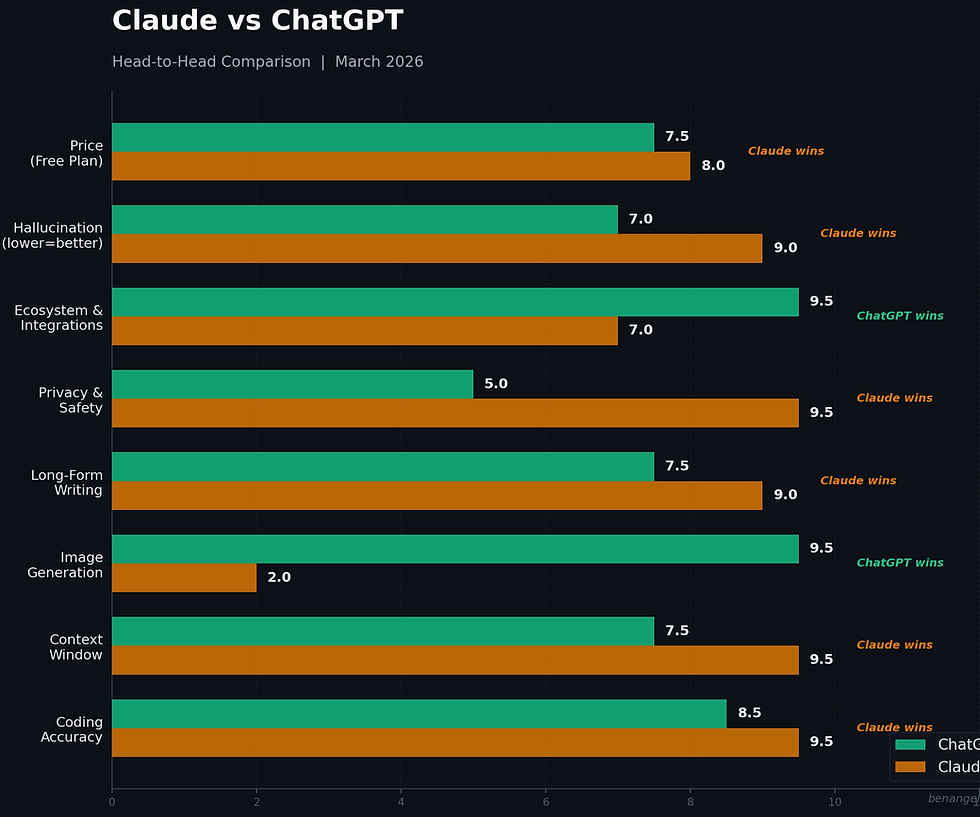
Claude vs ChatGPT: The Full Comparison (March 2026)
Both tools cost $20/month at the Plus/Pro tier. Both are extremely capable. But they’re built for different strengths. Here’s the honest breakdown.
Where Claude Wins
Coding Accuracy — In a 30-day independent test by Ryz Labs, Claude achieved roughly 95% functional accuracy on coding tasks compared to about 85% for ChatGPT. Claude Code, included free in the $20 Pro plan, can autonomously navigate codebases and make multi-file edits. If you’re a developer or building apps, Claude is the safer bet.
Context Window — Claude handles up to 200,000 tokens on paid plans (with 1 million tokens available via API). ChatGPT maxes out at 128,000. In practical terms, Claude can hold an entire book or codebase in memory without losing track of details from earlier in the conversation.
Long-Form Writing — Claude produces more natural, coherent narratives across 300+ pages. If you’re writing books, long reports, or deep-dive content, Claude maintains consistency where ChatGPT tends to get repetitive or lose its thread.
Privacy and Safety — Anthropic built Claude on Constitutional AI — a framework designed to make responses more honest and grounded. Claude hallucinates less and, as we just covered, the company literally walked away from a weapons deal over ethical lines. That matters when you’re trusting AI with your business data.
Hallucination Rate — In independent benchmarks and real-world enterprise testing, Claude consistently shows a lower hallucination rate. ChatGPT is more "confident" in its outputs, which sometimes means it confidently makes things up.
Where ChatGPT Wins
Image Generation — ChatGPT integrates DALL-E for seamless AI image creation. Ask it to generate marketing visuals, product mockups, or illustrations and it delivers. Claude cannot generate images natively — you’ll need a separate tool like Midjourney or Canva.
Ecosystem and Integrations — ChatGPT connects to more apps, has a larger plugin marketplace, and integrates with the broader OpenAI ecosystem (Sora for video, Whisper for transcription). If you need one tool that does everything, ChatGPT’s ecosystem is bigger.
Speed — ChatGPT averages about 45ms response time versus Claude’s 50ms. For quick back-and-forth tasks, ChatGPT feels snappier.
Where They Tie
Price — Both are $20/month for their core paid plan. Claude Pro includes Claude Code. ChatGPT Plus includes image generation and GPT Store access. Both have generous free tiers.
Creative Content — For social media copy, email campaigns, and brainstorming, both are excellent. ChatGPT tends toward punchier, more varied outputs. Claude tends toward more structured, careful writing. Pick based on your style preference.
The Bottom Line: Which One Should You Use?

Here’s my honest take — and it’s shaped by something I wrote about in my ai book, The Wolf Is at the Door.
In the book, I warned about Threat #10: Weaponization. Not just literal weapons — but the weaponization of platforms, infrastructure, and power. When AI companies align themselves with centralized power structures without clear guardrails, entrepreneurs become exposed.
The real risk isn’t the tool. It’s dependency.
So this decision isn’t just about features.
It’s about sovereignty.
If you’re an entrepreneur who values privacy, long-form depth, and a company that has demonstrated a willingness to walk away from ethical red lines — Claude is, right now, the more strategically aligned choice. Not because it’s morally perfect. But because it has shown restraint where others have chosen expansion.
Trust matters when you’re feeding an AI your intellectual property, your client data, your strategy, your thinking.
That said, power without strategy is just risk.
ChatGPT still has the broader ecosystem — image generation, video capabilities, deeper integrations, and a faster iteration loop. If you’re building visual campaigns or need multimodal output, it remains incredibly useful.
But here’s the principle I stand by:
Never build your entire business on a single AI platform.
In the book, I talk about mobility as survival. The entrepreneurs who thrive in volatile environments are the ones who stay adaptable, modular, and platform-agnostic. They don’t marry tools. They build systems.
And beyond strategy — trust your intuition.
You don’t need to outsource your ethics to Twitter. You don’t need to follow a boycott because it’s trending. And you don’t need to ignore your discomfort if something feels off.
If a company’s direction doesn’t sit right with you, that matters.
If you believe technological power should have guardrails, stand by that.
If you care more about capability than politics, own that too.
Your business is an extension of your principles. The tools you use are part of that expression.
So my recommendation is strategic, not emotional:
Use Claude as your primary writing and thinking partner if privacy, structured reasoning, and ethical posture matter to you.
Use ChatGPT where its ecosystem gives you leverage — visuals, experimentation, rapid ideation, unless it directly conflicts with your values.
Export your data regularly from both.
Maintain optionality.
Make decisions that align with your values.
The wolf is always at the door — whether that wolf is regulation, geopolitics, corporate incentives, or sudden policy shifts.
The entrepreneurs who survive aren’t the ones who panic.
They’re the ones who stay mobile, think independently, and stand firmly on their principles.
Watch the Full Breakdown
I cover all five AI tools shaping one-person businesses this week — plus the full Pentagon story and live migration demo — in this week’s video at the top of this post. Subscribe to my YouTube channel for the full walkthrough.
Ready to Master AI in 28 Days?
If you’re serious about integrating AI into your business, my 28-Day AI Mastery Course walks you through everything — from choosing the right tools to building automated workflows that save you 10+ hours per week.
Ben Angel is the bestselling author of The Wolf Is at the Door and the creator of the 28-Day AI Mastery Course. He helps entrepreneurs become unstoppable by mastering both AI and themselves.

When pasting the prompt to Claude, it's telling me what's below: What I can't do: I can't permanently store uploaded files or documents in a way that persists between conversations. Each conversation, I work from the memory summaries that have been built up over time — not from files you've uploaded in a previous session. So while I can absolutely analyse documents you share within a conversation, I can't "remember" a file you uploaded last week.
What this means practically: The workflow you've described (uploading assets one by one, me confirming and remembering each) works best as a within-conversation setup session — I'd use what you share to give you rich, informed outputs right now, and the key insights would be captured into my memory…