_edited.png)
Claude for Small Business: 15 AI Workflows for Marketing, Sales, Finance and Admin

Updated: Aug 13
Running a small business can feel like spending half your day moving the same information between QuickBooks, PayPal, HubSpot, Gmail, Canva and your calendar. Claude for Small Business is Anthropic’s attempt to turn that scattered admin into a set of repeatable AI workflows that work across the tools you already use.
That matters because most entrepreneurs are not short of AI-generated words. They are short of time, clean handoffs and reliable processes. A chatbot can draft an email. A useful operating system needs to find the right customer information, understand what “good” looks like, prepare the work and stop at the point where human judgment is required.
Quick answer: Claude for Small Business is a ready-made plugin for Claude Cowork containing 15 workflows and supporting Skills for finance, sales, marketing, customer service, operations and business reporting. It can connect with tools such as QuickBooks, PayPal, HubSpot, Canva, DocuSign, Gmail, Google Workspace and Microsoft 365. You describe the job in plain English, Claude follows the workflow and you approve consequential actions before anything sends, posts or pays.
Installing those workflows is only the beginning. You still need to adapt them to your business, define the standard and decide where approval belongs. That implementation discipline is what I teach inside the 28-Day AI Mastery Course: start with a bottleneck, build one reliable system around it, then expand.
In This Article
What Is Claude for Small Business?

Claude for Small Business is a downloadable plugin that installs a collection of prebuilt business workflows inside Claude Cowork. Anthropic launched it on May 13, 2026, after finding that small-business AI adoption often stopped at the chat window. The package is designed to move Claude closer to the work sitting across accounting, payment, CRM, design, contract, email and calendar systems.
Before putting those workflows in front of clients, understand what the Claude watermark means for business users, authorship and reputation.
The terminology sounds more technical than the experience needs to be. Think of it this way:
Claude Cowork is the back office. It is where Claude handles a multi-step assignment and shows its progress.
The plugin is a ready-packed business toolkit. Instead of assembling every process yourself, you install the Small Business package.
Skills are the laminated checklists. Each one tells Claude how to complete a repeatable job such as chasing invoices or triaging leads.
Connectors are approved access badges. They allow Claude to read information from tools such as QuickBooks, HubSpot or Gmail within the permissions you already have.
Scheduled Tasks put recurring jobs on Claude’s calendar. They can produce a weekly brief or research report without waiting for you to remember.
That distinction is important. Regular Claude can help you think through a problem. Claude for Small Business arrives with the steps for common business jobs already mapped out.
How Does Claude for Small Business Work?

The system follows a simple chain: you choose the job, Claude gathers the approved context, a Skill supplies the process, and you review the result. That is much closer to briefing a capable assistant than writing one enormous prompt.
Imagine asking for a campaign to fill a quiet sales month. The workflow can read sales history, identify the slow period, help shape the offer, create a campaign brief, prepare Canva assets, prioritize leads in HubSpot and stage the email. It should not publish the campaign or contact customers until you approve it.
The workflow has five practical layers:
You define the outcome. “Help me fill the quiet period in August” is clearer than “make me a marketing campaign.”
Claude identifies the required tools. It might need HubSpot for lead information and Canva for campaign assets.
The Skill supplies the steps. Claude follows a repeatable method instead of improvising the process from scratch.
Cowork coordinates the work. You can see progress, connected context and the output being prepared.
You approve the consequence. Sending, posting, paying, signing and changing important records remain human decisions.
In my own AI-supported content workflows, the biggest improvement has never come from handing AI everything at once. It comes from defining the finish line, giving the system only the context it needs and reviewing its output against a visible standard. That is also the difference between an AI tool and an AI brain built around your business.
The 15 Claude for Small Business Workflows

Anthropic’s plugin includes 15 main workflows. The official names appear as commands beginning with a slash, but you do not have to memorize them. Describe the job in ordinary language and Claude can select the appropriate Skill.
Protect the cash
1. Plan payroll (`/plan-payroll`)
Claude builds a 30-day cash forecast, ranks overdue invoices and drafts reminders. For a solopreneur with contractors due on Friday, the result should answer three questions: Is payroll covered? Which incoming payments matter most? What needs attention today? Claude prepares the analysis; you and your accountant make the financial decisions.
2. Get a month-ahead warning (`/month-heads-up`)
This workflow scans the next 30 days, identifies the tightest week and flags what could create a cash squeeze before month-end. The value is not predicting the future perfectly. It is surfacing a problem early enough for you to change the timing of spending, collections or promotions.
3. Close the month (`/close-month`)
Claude compares the books with payment settlements, flags mismatches, writes a plain-English profit-and-loss explanation and prepares a close packet for your accountant. This can remove clerical preparation, but every discrepancy and accounting treatment still needs professional review.
4. Check prices and margins (`/price-check`)
This workflow builds a margin-by-product view and models different pricing scenarios with break-even calculations. It can show that a popular product is consuming too much support time or that a small price change protects margin. You decide what the market will accept.
5. Prepare for tax time (`/tax-prep`)
Claude can organize quarterly estimates or prepare a year-end contractor list for your accountant. Treat it as a document-preparation assistant, not a tax adviser. Its job is to reduce the pile of uncategorized information your professional has to untangle.
Find and convert demand
6. Build today’s call list (`/call-list`)
Claude scores leads using fit, urgency and engagement, then prepares a call card for the strongest opportunities. A useful call card should include the prospect’s situation, recent activity, likely objection and recommended next step—not another generic sales script.
7. Find what is selling (`/sales-brief`)
This workflow ranks top and bottom sellers and turns the pattern into a content plan. If one offer is creating stronger sales, replies or repeat purchases, Claude can help redirect attention toward the evidence rather than whichever idea feels exciting that morning.
8. Run a campaign (`/run-campaign`)
Claude reads sales history, finds a slow stretch, drafts an offer, builds campaign assets and stages the send using HubSpot and Canva. This is the most commercially interesting workflow in the package because it connects insight with production. The safeguard is equally important: nothing should reach the audience before you check the claim, offer, targeting and creative.
If you are building a complete acquisition system rather than one campaign, my guide to generating leads with AI explains how research, content, capture and analytics need to work together.
Protect the customer experience
9. Handle a complaint (`/handle-complaint`)
Claude reads a customer email, checks the available order and account history, then drafts a response suited to the situation. The advantage is context: a loyal customer with one late shipment should not receive the same reply as a repeated refund abuser. Review tone, remedy and any promise before sending.
10. Check the customer pulse (`/customer-pulse-check`)
This workflow groups disputes, tickets, emails and reviews into recurring themes, then drafts a possible response for each. Its best use is finding the operational pattern beneath the noise—perhaps unclear onboarding, a delivery expectation or one confusing part of the product.
11. Clean up the CRM (`/crm-cleanup`)
Claude finds stale deals, duplicate contacts and missing fields, showing you what it found before changing anything. Start in report-only mode. Once you trust the logic, approve small batches rather than allowing an untested cleanup rule to rewrite the entire database.
12. Review a contract (`/review-contract`)
Claude creates a plain-English summary, identifies potential red flags and prepares a marked-up redline from an uploaded contract, with optional DocuSign context. This is useful preparation for a lawyer or experienced decision-maker. It is not a substitute for legal advice, especially when liability, intellectual property, privacy or employment obligations are involved.
See the whole business
13. Create a Monday brief (`/monday-brief`)
This one-page report can combine cash, sales trends, pipeline movement, calendar commitments and urgent messages, then rank the items that most need you. It is the workflow I would expect many solopreneurs to feel immediately because it replaces the Monday ritual of opening six tabs and trying to decide what matters.
14. Create a Friday brief (`/friday-brief`)
Claude compares revenue with the previous week, summarizes what sold and identifies wins and concerns. The important question is not whether Friday’s report looks impressive. It is whether Monday’s priorities improve because of what Friday revealed.
15. Prepare a quarterly review (`/quarterly-review`)
This workflow turns revenue, margin, customer health, risks and opportunities into a readable quarterly narrative. For a one-person business, that creates a moment to step out of delivery mode and decide what to stop, protect or expand.
Four Workflows I Would Test First

Fifteen workflows sound impressive, but installing all of them at once is a good way to create a sophisticated mess. Start with the job that returns every week, has a clear output and is currently wasting measurable time.
I would test them in this order:
Monday brief: Use it when information is scattered and the real bottleneck is deciding what deserves attention.
Lead triage: Use it when opportunities exist but follow-up is inconsistent or driven by recency rather than value.
Campaign builder: Use it when sales data, offer creation and asset production are disconnected.
Invoice chaser: Use it when money is already owed and delayed follow-up is creating a cash-flow problem.
Use this decision rule:
If you repeatedly ask, “What should I focus on?”, start with the Monday brief.
If you repeatedly ask, “Who should I contact?”, start with lead triage.
If you repeatedly ask, “What should we promote?”, start with the campaign workflow.
If you repeatedly ask, “Where is the money?”, start with invoice follow-up.
Then run the workflow manually for four weeks. Record the time it replaces, the corrections it needs and whether the result improves a real business decision. Only schedule it after the manual version is dependable. This is how you turn repetition into a controlled AI loop rather than automated guesswork.
How to Set Up Claude for Small Business

According to Anthropic’s current installation guide, you need the Claude desktop app and a Pro, Max or Team plan.
The basic setup takes five steps:
Download or update the Claude desktop app.
Open Cowork, then select Customize in the sidebar.
Open Plugins, select the plus button, find Small Business and choose Install.
Connect only the tools required for the first workflow.
Ask Claude to get you started and answer its questions about your business, priorities and preferred way of working.
Do not connect QuickBooks, PayPal, HubSpot, Gmail, Canva and DocuSign simply because the buttons exist. If the first job is lead triage, begin with HubSpot. If the first job is a Monday brief, decide which two or three sources genuinely determine your priorities.
Before the first live run, define:
the exact output you expect
the period Claude should examine
the source of truth for each number
what Claude may draft or change
what always requires approval
what a successful result looks like
The installed workflows contain useful defaults, but defaults belong to an imaginary average business. Customize the Skill with your payment terms, sales stages, customer categories, reporting priorities and brand standards. Anthropic says your corrections can be saved into the workflow for future runs.
How Much Does Claude for Small Business Cost?

Anthropic’s Small Business FAQ does not currently advertise a separate surcharge for the plugin. It points individuals toward standard Claude Pro pricing and businesses toward Claude Team pricing.
As of July 22, 2026:
Claude Pro: US$20 per month, or US$200 per year.
Claude Max 5x: US$100 per month.
Claude Max 20x: US$200 per month.
Claude Team Standard: US$25 per member monthly, or US$20 per member per month when billed annually.
Claude Team Premium: US$125 per member monthly, or US$100 per member per month when billed annually.
Anthropic’s live pricing page currently describes Team as supporting 2–150 people, while its Team plan Help Center article still refers to a five-member minimum. That is exactly why pricing and eligibility should be checked at checkout rather than copied from an older comparison.
Connected products can add their own costs. Staging a campaign in HubSpot, producing designs in Canva or accessing particular accounting features may require paid plans with those companies.
For a solopreneur, the decision should be based on recovered value:
Monthly value = hours saved × value of your time + cash recovered + avoidable errors reduced − subscription and review costs.
If a US$20 subscription saves three hours of low-value admin but creates two hours of correction work, the workflow is immature. If it helps you collect overdue invoices sooner, protects margin or prevents valuable leads from being ignored, the return can be much larger than the subscription price.
Which Tools Can Claude Connect To?

Anthropic highlights QuickBooks, PayPal, HubSpot, Canva, DocuSign, Google Workspace and Microsoft 365 in the Small Business package. Individual workflows also reference Gmail, Google Calendar and connected files. Its broader plugin system can package Skills, connectors and specialist subagents around a particular business function.
Choose the connection according to the job:
QuickBooks and PayPal: cash forecasting, invoices, settlements, margins and month-end preparation.
HubSpot: lead prioritization, pipeline review, CRM cleanup and campaign staging.
Canva: social designs and campaign assets prepared from an approved brief.
Gmail and Google Workspace: messages, documents, calendars and recurring briefings.
DocuSign: contract context and document workflows.
Microsoft 365: business documents, email, calendars and organizational context where supported.
Claude also supports direct creation of Excel, PowerPoint, Word and PDF files. That can turn the result into something your accountant, contractor or client can actually use rather than another long chat response.
The safe default is minimum access. A workflow preparing a sales brief does not need permission to alter payroll. A contract summary does not need your entire inbox. Give each workflow the smallest set of keys required to complete its job.
What Should Claude Never Approve Alone?
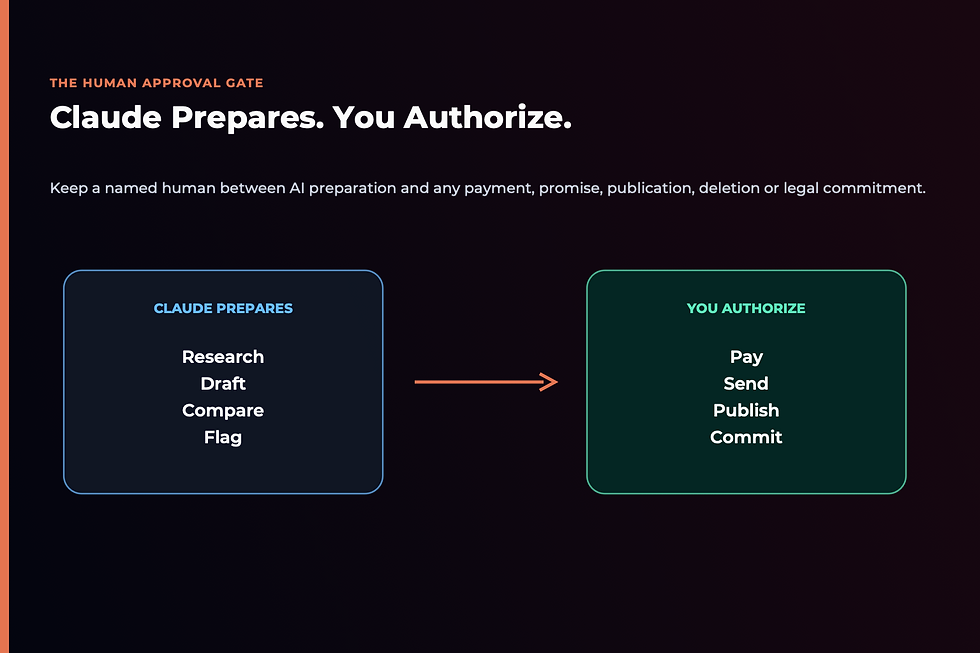
Claude can prepare consequential work, but preparation and authority are different things. Anthropic says users approve before anything sends, posts or pays, and that existing permissions continue to apply. The company also states that business content on Team and Enterprise plans is not used for model training by default.
Keep direct human approval over:
payments, payroll and transfers
tax classifications and accounting adjustments
contract signatures and legal commitments
prices, discounts and refund exceptions
customer messages involving disputes or sensitive situations
deleting contacts or changing the system of record
publishing campaigns, advertisements or public claims
access to sensitive employee, customer or health information
Computer Use deserves extra caution. When Claude operates a screen, it may see information visible in the approved application and takes screenshots to understand the interface. Anthropic warns that safeguards are imperfect and direct screen interaction is slower and more error-prone than a reliable connector.
My rule is simple: let AI prepare the reversible work; keep human control over irreversible consequences.
Claude for Small Business vs Regular Claude vs ChatGPT

The right choice depends on the job rather than the logo.
Choose regular Claude chat when:
you need help thinking, writing or analyzing one assignment
the work does not require a prepared multi-step process
files can be uploaded manually
the result will be used once
Choose Claude for Small Business when:
the same finance, marketing, sales or operational job keeps returning
the work needs context from several connected business tools
you want a prebuilt process that can be customized
the output needs an explicit approval boundary
Choose ChatGPT when:
your existing systems already live inside ChatGPT Projects, Work, Goals, Skills or Plugins
you need a broader general-purpose environment across research, content, coding and production
a specific ChatGPT feature fits the workflow better
My ChatGPT vs Claude vs Perplexity vs Gemini comparison breaks down the platforms by business function. If you decide Claude is the better home for your workflows, use the five-minute ChatGPT-to-Claude migration guide to move useful context deliberately.
Is Claude for Small Business Worth It?

Claude for Small Business is worth testing when scattered information and repetitive coordination are more expensive than the subscription and review time. It is less compelling when the business has no stable process, unreliable source data or too little recurring work to justify setup.
It is a strong fit when:
you already pay for several supported business tools
the same report, follow-up or review returns every week
the result has a clear definition of done
you can check the output against reliable records
you are willing to customize the workflow instead of accepting the default
It is a poor fit when:
every assignment is genuinely unique
your CRM, accounts or customer records are unreliable
nobody owns final review
you expect installation to repair a confused business process
the main goal is simply producing more content
The key test is whether Claude changes a complete business outcome. Saving five minutes on a draft is pleasant. Helping you identify the right leads, prepare the campaign and stage the assets creates a much more meaningful form of leverage.
Frequently Asked Questions

When did Claude for Small Business launch?
Claude for Small Business launched on May 13, 2026. Anthropic introduced it as a package of connectors, 15 ready-to-run workflows and 15 supporting Skills for common small-business work.
Is Claude for Small Business a separate version of Claude?
No. It is a plugin installed inside Claude Cowork rather than a separate chatbot or model. The plugin bundles prepared Skills and the connectors required for common business workflows.
Can a solopreneur use Claude for Small Business?
Yes. Anthropic’s installation guide lists Pro, Max and Team plans, so an individual does not need a multi-person Team subscription to install the plugin. Availability and limits can change, so confirm the current plan comparison before subscribing.
Is Claude for Small Business free?
The plugin does not currently have a separately advertised price, but the official installation guide requires a paid Pro, Max or Team plan. Connected services such as HubSpot, Canva or QuickBooks may also require their own paid subscriptions.
Does Claude for Small Business work in a browser?
The current setup guide says the Small Business solution runs in Claude Cowork through the desktop app. Some plugin Skills can work in regular chat, but hooks, subagents and the complete Cowork experience have different availability.
Does Claude need access to all my business tools?
No. Connect only the tools required for the workflow you are testing. Existing account permissions continue to limit what Claude can see, but every additional connection expands the information available to the system.
Will Anthropic train Claude on my business data?
Anthropic states that it does not train on Team and Enterprise business content by default. Individual-plan users should review the current privacy settings and terms for their account rather than assuming every plan has identical controls.
Can Claude send emails, publish content or make payments automatically?
The Small Business workflows are designed to prepare and stage work, with approval before anything sends, posts or pays. Keep that approval requirement active until a narrow workflow has been thoroughly tested—and retain human control over high-consequence actions.
Can Claude replace my accountant, lawyer or sales manager?
No. Claude can prepare reports, organize records, summarize contracts and prioritize leads, but qualified professionals and business owners remain responsible for financial, legal, employment and customer decisions.
What is the best Claude for Small Business workflow to try first?
For most solopreneurs, the Monday brief is the safest first test because it begins with reading and prioritizing information rather than changing records or contacting customers. Lead triage is a strong second choice when missed follow-up is a visible revenue problem.
Start With One Repeated Job

The headline promise of Claude for Small Business is 15 workflows. The practical opportunity is much smaller and more valuable: find one recurring job you understand well enough to teach, test and improve.
Choose a weekly bottleneck. Define the output. Connect the minimum context. Run it manually. Correct the Skill. Measure the time and commercial result. Then decide whether it deserves a schedule.
That approach reflects the warning behind The Wolf Is at the Door: competitive advantage does not come from merely owning the same AI as everybody else. It comes from combining the technology with clearer judgment, stronger standards and the courage to redesign how the business works.
If you want a structured implementation path, the 28-Day AI Mastery Course will help you identify the right workflow, build the supporting context and turn the experiment into a system you can trust.


Comments