_edited.png)
How to Use Codex: A Step-by-Step Guide for Entrepreneurs, With Screenshots and When to Use It Instead of Claude

Updated: Aug 13
If you've been wondering how to use Codex, the first thing to understand is that it's not just another AI chatbot.
If you've been using AI like a glorified autocomplete, Codex is going to feel different.
Not better in every situation. Not magic. But different in a way that matters.
Most AI tools still behave like smart assistants waiting for your next message. Codex is closer to an operator. Once you learn how to use Codex effectively, you can give it a scoped task, access to the right environment, and clear rules, then it can actually go do the work: inspect files, run commands, test changes, browse documentation, use connected tools, and come back with something reviewable.
That shift matters if you're an entrepreneur.
Because the bottleneck is no longer, "Can AI generate an answer?"
The real question is:
Can AI help you move an actual project forward without turning you into a full-time babysitter?
That's where Codex starts to separate itself.
In OpenAI's official Codex materials, Codex is described as a software engineering agent that can work on tasks in parallel, run in isolated environments, read and edit files, execute tests and commands, and return verifiable logs and outputs for review. OpenAI also built a broader workflow around it: AGENTS.md instruction files, skills and MCP connections, worktrees, automations, browser tooling, and review flows in the Codex docs overview. That is a very different promise from "paste prompt, get answer." It is closer to delegation.
This guide will walk you through how to use Codex, why it feels different from Claude Code, where it is genuinely stronger, where Claude still has advantages, and how to use Codex in a way that actually saves time instead of creating a second job.
If you are newer to this category and want the non-technical foundation first, start with ChatGPT Smart and Simple AI Explained. That gives you the beginner frame. This guide is what comes next when you want AI to move from answering questions to operating inside real work.
Table of Contents
What Is Codex, Really?
Codex is OpenAI's coding agent for project work. In practice, that means Codex can inspect a codebase, run commands, make file changes, execute checks, and return reviewable logs and diffs instead of only giving you text advice.

The easiest way to think about Codex is this:
ChatGPT answers.
Claude collaborates.
Codex executes.
That is an oversimplification, but it is a useful one.
According to OpenAI's Codex documentation and launch materials, Codex can:
work on multiple coding tasks in parallel
run in isolated environments
read and edit files
execute commands, tests, linters, and type checkers
return logs and outputs so you can verify what happened
operate across local, CLI, IDE, and cloud-style workflows
That last point is important.
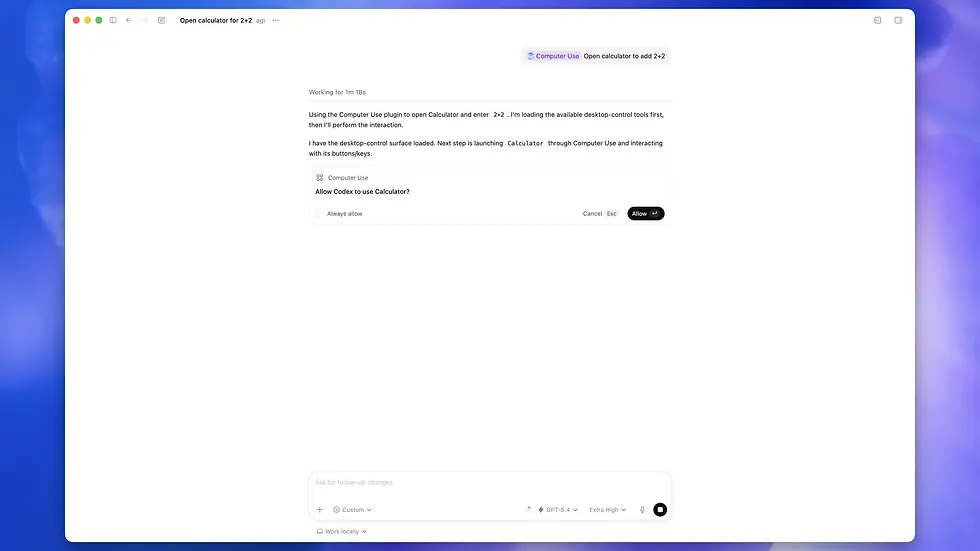
Codex is not just one chat window. OpenAI has turned it into a workflow system. The official docs show a surface area that includes the Codex app, CLI, IDE extension, and web mode, plus local environments, worktrees, in-app browser, computer use, and automations.
In plain English: Codex is trying to become the place where AI does real project work, not just generates ideas about project work.
That is why it matters to founders, operators, marketers, product people, and solo business owners who build things.
If you can explain what you want clearly enough, Codex can often do more than give you advice. It can help produce the change itself.
If that shift from "chat tool" to "work tool" still feels abstract, it helps to compare it with the broader beginner-friendly framing in AI for Beginners: 17 Real-World Tools. Codex sits at the more operational end of that spectrum.
18 Ways Entrepreneurs and Marketers Can Use Codex to Automate Work

Most articles about how to use Codex focus solely on coding.
That's a mistake.
The bigger opportunity for entrepreneurs is using Codex to handle operational work that normally consumes hours each week.
For example, imagine asking Codex to:
Research a topic, write a draft blog post, upload it to Wix or WordPress, format headings correctly, insert internal links, add alt text to images, and leave the article ready for final review.
Or connect to Kajabi, analyze the performance of your last 20 email campaigns, identify subject lines with the highest open rates, and build three new email sequences based on the winning patterns.
If you're running a content business, Codex could review your top-performing YouTube videos, identify recurring themes, and create a content calendar with titles, outlines, blog topics, email angles, and social posts.
For coaches and consultants, Codex could analyze discovery call transcripts, identify common objections, update your sales scripts, and prepare follow-up email drafts automatically.
For ecommerce businesses, Codex could audit product descriptions, find missing SEO opportunities, update metadata, and generate new versions based on your highest-converting products.
For agencies, Codex could monitor multiple client websites, identify broken links, missing metadata, outdated content, or technical issues, then create a report with recommended fixes.
For marketers, Codex could:
Analyze competitor blogs and identify content gaps.
Compare Facebook ads and landing pages from competitors.
Review Google Search Console data and identify pages losing traffic.
Generate content briefs optimized around target keywords.
Update internal linking across hundreds of articles.
Audit lead magnets and funnel pages for conversion opportunities.
For founders building with AI, Codex could:
Connect to GitHub and review project progress.
Monitor feature requests and customer feedback.
Create documentation for new releases.
Generate investor update drafts.
Build internal knowledge bases from scattered files and documents.
The point is not that Codex replaces employees.
The point is that Codex can take ownership of repeatable workflows that normally require
dozens of manual steps.
That's when AI stops being a chatbot and starts becoming a force multiplier.
Why Codex Feels Different From Claude
Codex vs Claude is really a workflow decision. Codex is stronger when you want to hand off a scoped task and review the output later. Claude Code is stronger when you want a tighter conversational coding loop while you actively steer the work.

Claude Code is serious. It is not some weaker alternative. Anthropic's official Claude Code docs make it clear that Claude Code is built for real terminal and developer workflows, with MCP support, CI use cases, and broad connectivity to external systems.
So this is not a "Codex crushes Claude" article.
That would be lazy.
The real difference is in the center of gravity.
Claude Code feels like a strong technical collaborator inside a direct coding loop.
Codex feels more like a task-oriented software operator with a broader product shell around it.
Here is the practical distinction:
Use Codex when you want delegation
Codex is strongest when you want to say:
"Inspect this project, find the likely cause, run the checks, make the smallest safe fix, and show me the diff."
That is very different from:
"Help me think through this problem."
OpenAI's official positioning leans hard into that delegation model. In the original launch materials, the company emphasized parallel tasks, isolated execution environments, GitHub-connected workflows, reviewable logs, and pull-request-ready outputs.
If you're managing multiple moving parts, that is powerful.
Use Claude when you want a tighter back-and-forth coding loop
Claude still has a strong claim when you want an AI pair programmer sitting close to your terminal workflow, especially when the main job is iterative thinking, shaping, clarifying, and fast feedback inside a direct loop.
That is where a lot of people get confused.
They compare these tools as if they are just two model answers in a box.
They're not.
They are workflow choices.
And workflow is where time is won or lost.
If you've already read How to Switch from ChatGPT to Claude in 5 Minutes, this is the next comparison to make. That article is about switching assistants. This one is about knowing when you need an operator instead of a conversational partner.
How to Set Up Codex
To understand how to use Codex well, set up the tool, connect it to a real project, and define the rules it should follow. The biggest jump in quality usually comes from better environment setup and clearer instructions, not from fancier prompts.

The setup is simpler than most people think, but the difference between "installed" and "useful" is huge.
OpenAI's official quickstart shows that you can install Codex locally, run codex, and sign in with either your ChatGPT account or an API key. The web/cloud flow also lets you connect a GitHub repository, launch a task, monitor logs, and review the diff before creating a pull request.
That means there are really two setup paths:
Path 1: Local or desktop workflow
This is the path to use if you want Codex close to your actual machine, local files, and app workflows.
At minimum, you want:
a project or folder Codex can inspect
a clean way to checkpoint work with Git
clear instructions for how the project should be handled
at least one test or validation command if code is involved
If you skip those last two, Codex will still work. It will just make more assumptions than you probably want. Thankfully because it is conversational AI, if you get stuck, you can ask it to set it up for you. No technical experience needed.
Path 2: Cloud or GitHub-connected workflow
This is the better choice when you want Codex working on tasks in the background while you focus on other things, such as; an automation that researches updates in your field of expertise, drafting a blog based on that insight, and then checking it for plagiarism before it ever crosses your eyes.

OpenAI's official cloud workflow is built around:
connecting a repository (linking your project, website, or app)
launching a task (giving Codex a job to complete)
monitoring progress (watching the work happen in real time)
reviewing logs and diffs (checking what changed before approving it)
opening a pull request (submitting the proposed changes for approval)
This is where Codex starts to feel less like chat and more like delegation.
The mistake most people make during setup
They install the tool and assume the tool is the system.
It isn't.
The system is:
your repo or workspace (the project, website, app, or business system Codex is working on)
your testing and review habits (how you check the work before approving it
your instruction files (the rules and standards you want Codex to follow)
your connected tools (the apps and platforms Codex can access, such as GitHub, WordPress, Kajabi, or Google Drive)
the quality of the task you hand over (how clearly you explain what success looks like)
Like any AI model, Codex gets dramatically better when the environment is clean and the rules are obvious.
That is not a flaw in Codex. That is what happens when you stop asking AI for trivia and start asking it to operate.
Your First Three High-Value Codex Tasks
If you want to know whether Codex is useful, do not start with "build my startup."

That is the fastest route to disappointment.
Start with work that is small enough to verify but meaningful enough to matter.
1. Ask Codex to explain an unfamiliar project
This is one of the best first tasks for non-developers and technical founders alike.
Prompt example:
Inspect this project and explain what it does, how it is structured, the main failure points, and what I should be careful changing first.
This is valuable because it shifts AI from content generation into operational intelligence.
Instead of giving you a generic answer about architecture, Codex can inspect the real files and give you a project-specific explanation.
2. Ask Codex to fix one narrow bug
Prompt example:
Reproduce the issue, identify the most likely cause, make the smallest safe fix, run the relevant checks, and summarize exactly what changed.
This is where Codex becomes useful fast.
Not because it always gets the answer right.
Because it can show its work.
The reviewable logs matter. The test outputs matter. The diff matters.
Entrepreneurs waste a lot of money paying for "AI help" that cannot be verified. Codex is more valuable when it gives you artifacts you can inspect instead of just confidence theatre.
3. Ask Codex to produce a repetitive but high-friction change
Examples:
update outdated blog posts with new research and internal links
audit a sales funnel and identify conversion bottlenecks
analyze your top-performing email campaigns and create new variations
review website pages for SEO issues and missing metadata
create a first draft of an automation workflow between your favorite business tools
Prompt example:
Connect to my Wix blog, research the latest developments on this topic, create a draft article optimized for SEO, add internal links to relevant articles, generate alt text for all images, and leave the post in draft mode for my review before publishing. Show me a summary of everything you changed.
This is classic founder leverage.
Not glamorous. Not Twitter-worthy. But very profitable.
How to Use AGENTS.md So Codex Stops Guessing
AGENTS.md is one of the highest-leverage Codex features because it reduces guesswork. It tells Codex how your project works, what commands to run, what standards to follow, and what changes to avoid.

This is one of the most important concepts in the entire article.
Think of AGENTS.md as the employee handbook for your AI worker.
Imagine hiring a new employee and saying:
"Go run my marketing department."
No training. No processes. No examples. No rules.
What happens?
They make things up.
Not because they're incompetent.
Because nobody told them how you want things done.
AGENTS.md solves the same problem for Codex.
OpenAI explains in its AGENTS.md guide that these files tell Codex how to work inside your project. They provide instructions, rules, preferences, and expectations before the AI starts making changes.
That is a big deal.
Because most frustration with AI isn't actually an AI problem.
It's an onboarding problem.
When people say:
"AI changed too much."
"It ignored my style."
"It broke something unrelated."
What they're often saying is:
"I never gave it clear instructions."
A good AGENTS.md file is like giving a new employee an SOP manual on their first day.
It explains:
How the project is organized
What success looks like
What should never be changed
The standards to follow
How work should be reviewed
Where important information lives
What must happen before a task is considered complete
If you run a business, you already understand this principle.
The more important the task, the less you rely on people guessing.
The same is true for AI.
If your instructions live only in your head, Codex will improvise.
And improvisation is expensive.
Why this matters more for entrepreneurs than they realize
Because entrepreneurs often use AI across messy environments:
half-documented side projects
landing pages with no tests
automations stitched together over time
content systems with inconsistent naming
team workflows that exist mostly in Slack and memory
That chaos is survivable when one human expert carries context.
It becomes a disaster when you delegate to AI without rules or have clear ai automation workflows for marketers or entrepreneurs in mind.
So if you want Codex to feel smart, stop feeding it raw chaos and start giving it operating doctrine.
How to Review Codex's Work Without Getting Burned
The safest way to use Codex is to think of it like a highly capable employee who can work incredibly fast but still needs supervision. If you hired a new marketing manager and asked them to redesign your funnel, rewrite your emails, and update your website, you wouldn't approve everything without checking their work first.
The same principle applies here.
Before accepting any recommendation or change from Codex, review what it did, why it did it, and whether the outcome actually matches your business goals. Don't be impressed by speed alone. Look at the evidence, review the proposed changes, and ask yourself a simple question: "If a human employee handed me this work, would I approve it?"
That's the mindset that keeps AI useful. Codex can dramatically reduce the time it takes to complete a project, but your job is still to provide judgment, context, and final approval.
This is where a lot of AI content gets dishonest.
People imply you can just press a button and trust the output.
You can't.
OpenAI itself is explicit in Introducing Codex that users should review and validate all agent-generated code before integration. That is the right framing.
Codex is useful because it can accelerate work.
It is dangerous if it tricks you into skipping judgment.
The Review Process I Would Use
Before approving anything, I'd quickly work through this checklist:
• Read the summary first and make sure Codex actually understood the assignment.
• Review the proposed changes and confirm they align with your goals.
• Check the evidence behind the recommendations instead of relying on confidence alone.
• Look for scope creep and make sure Codex didn't start changing things you never asked it to touch.
• Do a final sanity check and ask yourself, "If a team member handed me this work, would I approve it?"
What to Watch For
• It fixed the visible problem but missed the underlying cause.
• It changed far more than was necessary to complete the task.
• It made assumptions that sounded reasonable but were actually incorrect.
• It optimized for the task while overlooking the bigger business objective.
• It introduced inconsistencies with your brand, content style, customer experience, or existing workflows.
This is where founders need restraint.
If you're not technical, the temptation is to equate polished output with quality work. The reality is that a confident explanation, a professional-looking report, or a beautifully written piece of content can still be wrong.
That's why Codex's review trail matters. Whether you're reviewing a blog post, an automation, a website update, or a software change, the goal isn't just to see the final result.
The goal is to understand what was changed, why it was changed, and whether the reasoning holds up. That's not a developer habit. It's a business habit.
When to Use Codex Instead of Claude
If you're deciding between Codex vs Claude, use Codex when you want delegation and reviewable execution. Use Claude when you want faster conversational refinement while you stay in the driver's seat.
This is the part people actually care about.
So let me make it simple.
Choose Codex when:
You want to hand off a task and come back later to review the results.
You want AI to do real work, such as researching a topic, drafting a blog post, updating a website, or auditing a funnel.
You want to connect multiple parts of your business, such as your blog, email platform, CRM, social media accounts, and automations.
You want an AI that can follow processes, check its work, and provide evidence for the changes it made.
You want to build repeatable systems that save time every week instead of starting from scratch every time.
Choose Claude when:
You want to think through a problem with an AI partner in real time.
You want help refining ideas, strategies, content, or technical decisions through conversation.
You prefer a collaborative back-and-forth where you're actively involved in every step.
You want to explore options, brainstorm solutions, and shape the work together before anything gets executed.
You care more about rapid collaborative refinement than broader product orchestration
Codex vs Claude at a Glance
Scenario: You want AI to research a topic, complete a task, and come back with the finished work.
Choose Codex: Yes
Choose Claude: Sometimes
Scenario: You want to automate parts of your marketing, content creation, website management, or business operations.
Choose Codex: Yes
Choose Claude: Less suited for this type of workflow
Scenario: You want help writing blog posts, email campaigns, social media content, or marketing strategies through conversation.
Choose Codex: Sometimes
Choose Claude: Yes
Scenario: You want AI to connect tools like Wix, WordPress, Kajabi, Google Drive, GitHub, or your CRM and work across multiple systems.
Choose Codex: Yes
Choose Claude: Sometimes
Scenario: You want to brainstorm ideas, refine plans, and think through problems together in real time.
Choose Codex: Sometimes
Choose Claude: Yes
Scenario: You want an AI employee that can execute tasks with minimal supervision.
Choose Codex: Yes
Choose Claude: Sometimes
Scenario: You want an AI advisor that helps you think, create, and make decisions.
Choose Codex: Sometimes
Choose Claude: Yes
The blunt version
Use Codex when the work feels like:
"Take this, run with it, and come back with proof."
Use Claude when the work feels like:
"Think this through with me while I drive."
That is not a benchmark claim.
That is a workflow claim.
And workflow claims are what serious buyers should care about.
Where Codex Still Falls Short
To trust this article, you need to know where the hype breaks.
Here it is.
1. Delegation is slower than instant interaction
OpenAI's own launch materials acknowledged that remote delegation takes longer than interactive editing. That means Codex can feel slower than Claude in the moment, even if it saves time on the full task.
If you are making tiny edits and want instant iteration, Codex can feel like overkill.
2. It still depends heavily on task quality
Bad instructions create bad outcomes.
Codex is not exempt from that just because it is more agentic.
In some ways, it is more vulnerable to vague prompts because it is empowered to do more.
3. Review is still your job
You are not replacing judgment.
You are moving your attention from typing every change to evaluating a proposed change.
That is leverage, but it is still work.
4. Entrepreneurs can misuse it by jumping too big too fast
The first instinct is usually:
"Build the whole thing."
The smarter move is:
"Handle the repetitive, scoped, annoying part first."
That is how trust is built.
That discipline matters beyond software. It is the same principle behind Top AI Tools for Entrepreneurs to Boost Productivity and AI Productivity Tips: Save 21 Weeks of Work a Year: start where AI removes friction, not where it creates fragile complexity.
A Practical Daily Workflow for Entrepreneurs
If you want a practical answer to how to use Codex inside a business, this is how I would think about it day to day.
Morning: analysis and planning
Use Codex to identify opportunities before you start working. Ask it to analyze your website for SEO issues, review your marketing funnel for bottlenecks, summarize customer feedback, identify content gaps, audit your automations, or highlight repetitive tasks that could be delegated.
If you're new to this jump to AI for Beginners: 17 Real-World Tools and ChatGPT Smart and Simple AI Explained.
Midday: scoped execution
Once you've identified the highest-leverage opportunities, hand Codex one or two specific tasks:
Research a topic and create a draft blog post ready for Wix or WordPress.
Analyze your latest email campaigns and suggest improvements based on performance data.
Audit a landing page and identify opportunities to increase conversions.
Create a first draft of an automation between your CRM, email platform, and lead forms.
Review website pages for SEO issues, broken links, and missing metadata.
Analyze competitors and produce a report highlighting content, funnel, or positioning opportunities.
Update older blog posts with new research, internal links, and optimization recommendations.
The key is to keep the scope tight enough that you can review the work quickly, but valuable enough that it saves you meaningful time.
If your goal is to save time rather than simply experiment with AI, it's worth understanding how Codex fits into the broader productivity stack. That's why I recommend reading Top AI Tools for Entrepreneurs to Boost Productivity and How to Use AI for Productivity: Can AI Agents Really 10x Your Output? fits naturally.
Afternoon: review and decision
This is where most of the value is created.
Review the work Codex completed, keep what worked, reject what didn't, and update your instructions so the next task gets better results with less supervision.
Think about it the same way you would train a new employee.
The first time you delegate a task, there are usually mistakes, questions, and corrections.
But once you've documented what good work looks like, future tasks become faster, easier, and more consistent.
That's the deeper lesson most people miss.
The real benefit isn't that Codex completed today's task.
The real benefit is that you're building a system that gets smarter every time you use it.
Today, you might be reviewing a blog draft, an email sequence, or an SEO audit.
Tomorrow, Codex already knows your standards, preferred workflows, and what success looks like.
That's when the relationship changes.
Instead of repeatedly explaining how you want things done, you're refining a system that can produce better work with less effort from you.
That's where Codex stops feeling like a cool AI tool and starts feeling like a valuable business asset.
Frequently Asked Questions About Codex
Is Codex just another coding chatbot?
No, and that's why it matters even if you've never written a line of code. Most "AI coding" tools just answer questions in a chat window. Codex actually goes into a project, runs tasks, executes commands, and hands back work you can review — the way you'd review a contractor's draft. For creators and marketers, the practical translation is this: it can take a messy folder of content, a Zapier-style workflow, or a half-built automation and actually do the work instead of describing how you'd do it.
Can non-developers actually use Codex?
Yes — if the task is concrete and you stay in the editor's seat. Creators and marketers are already getting value from Codex for things like cleaning up scripts and transcripts, generating documentation for their own SOPs, batch-updating product descriptions or email templates, fixing scoped issues in Shopify themes or landing pages, and automating repetitive content reformatting between platforms. The catch: polished output can still hide bad assumptions. You don't need to code, but you do need to read what it gives you before you ship it. Same review discipline you'd apply to a VA or a freelancer.
Is Codex better than Claude?
Wrong question — and it's the question keeping most creators stuck. Codex is built for asynchronous task delegation: you hand it a job, it runs, you review the output later. Claude is built for real-time collaboration: you think out loud together. For a solopreneur, that maps to two different jobs. Use Codex when you want a quiet operator chewing through repetitive content or automation work in the background. Use Claude when you want a sharp thinking partner in the room while you're writing, strategizing, or building something new. The creators winning right now aren't picking one — they're using both, for the jobs each is actually good at.
That collaborative workflow also raises a new disclosure question: see what the Claude watermark and client-trust risk could mean for authorship and your professional reputation.
Final Thoughts: Codex Is Most Useful When You Stop Treating It Like Chat
This is the real shift.
If you use Codex the way most people use AI, you will underuse it.
You will ask for explanations, maybe a few snippets, maybe some cleanup, and then wonder what the big deal is.
But if you use Codex as a delegated operator with rules, constraints, and review points, it becomes much more interesting.
Not because it replaces you.
Because it changes where your time goes.
You spend less time doing low-leverage mechanical work.
You spend more time deciding, refining, reviewing, and steering.
That is exactly where founders should be.
And that, more than benchmark chest-thumping, is the real reason Codex matters.
In The Wolf Is at the Door, I write about the people who get trapped chasing the next shiny thing instead of building systems that compound. That is exactly how most people misuse AI. They keep switching tools, collecting prompts, and reacting to the latest update. The better move is to build a repeatable operating layer that saves time every week.
If you want the deeper framework behind that idea, I unpack it in my best AI book, The Wolf Is at the Door.
If you're comparing tool-switching behavior more broadly, a natural supporting read is How to Switch from ChatGPT to Claude in 5 Minutes.
If you're trying to understand the larger agent shift behind these tools, tie this article to What Are AI Agents? How Phase 3 AI Will Transform Business.
For readers who want a deeper learning path after this guide, the most natural CTA is the 28-Day AI Mastery Course.


Comments